- US consumers risk being fleeced online as they cannot recognize the typical signs of the most common fraudulent websites
- Two thirds of Americans (68%) cannot spot all the red flags of a shady site, while four in five (79%) wrongly look for a padlock symbol to show a site is safe
- Cybersecurity company NordVPN found that the US lacks vital awareness about digital privacy and fraud linked to remote working
- Their National Privacy Test, taken by 175 countries, shows the world’s cybersecurity knowledge is in decline as online threats grow more complex
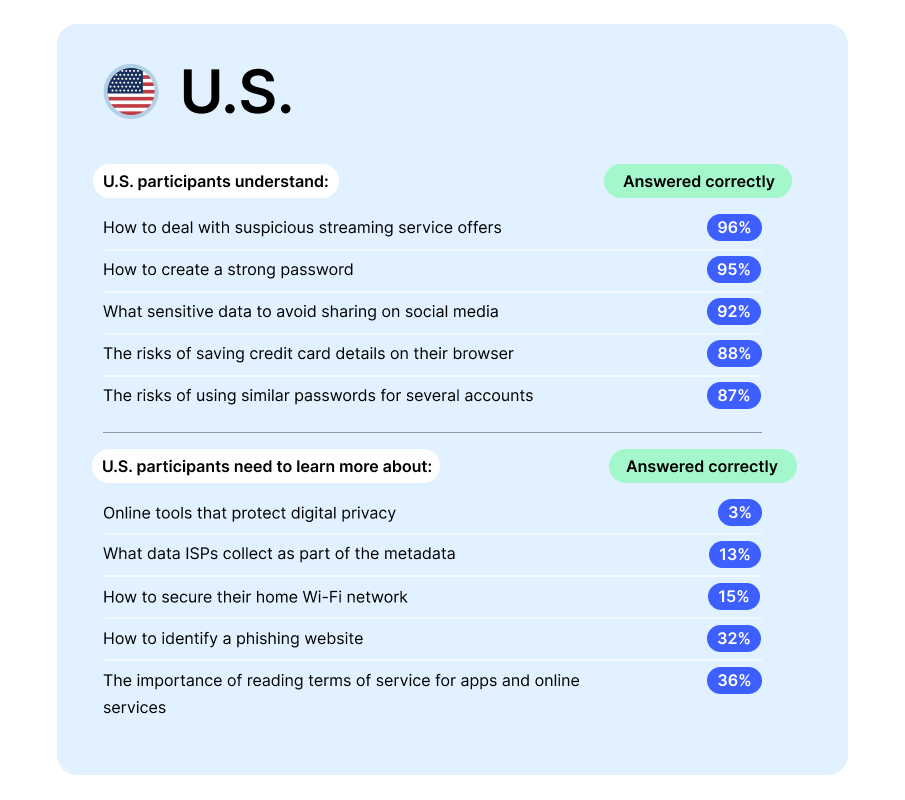
- It reveals most Americans can pick strong passwords and stay safe on social media, but a third (34%) don’t realize that updating their apps helps their security, while only one in eight (13%) knew the data their internet service could collect on them
Most Americans are failing to see through the most common traps laid for them online, like scam websites set up to take their money and data, reveals new research by cybersecurity company NordVPN.
Two in three (68%) US consumers could not correctly identify all the red flags of phishing websites, and many were relying on out-of-date safety information to protect them.
Phishing websites, often resembling those belonging to real businesses, are created to trick victims into giving away personal and financial information, such as passwords or credit card details. They can also be used to spread malware that can steal data, damage systems and even hand control of devices over to criminals.
NordVPN’s National Privacy Test – a global survey aimed to evaluate cybersecurity and online privacy awareness – revealed that four in five US consumers (79%) believe a padlock icon in a web browser’s address bar suggests they are using a trusted site. However this icon, which is due to be retired by Google Chrome later this year, only indicates a secure encrypted connection and is now common on scam websites[1].
Meanwhile, nearly a third of Americans (31%) admit they are suspicious of a website that does not have a copyright symbol at the bottom of a page, despite this having no bearing on its safety.
When it came to spotting fakes, three quarters (76%) correctly identified that a website’s digital certificate – or SSL – showing a random individual or company name would be a warning sign, with 80% accurately highlighting poor visuals and copy and 88% singling out a suspiciously named web address.
There are more than a million unique phishing websites operating online, and several new sites are created every minute[2].
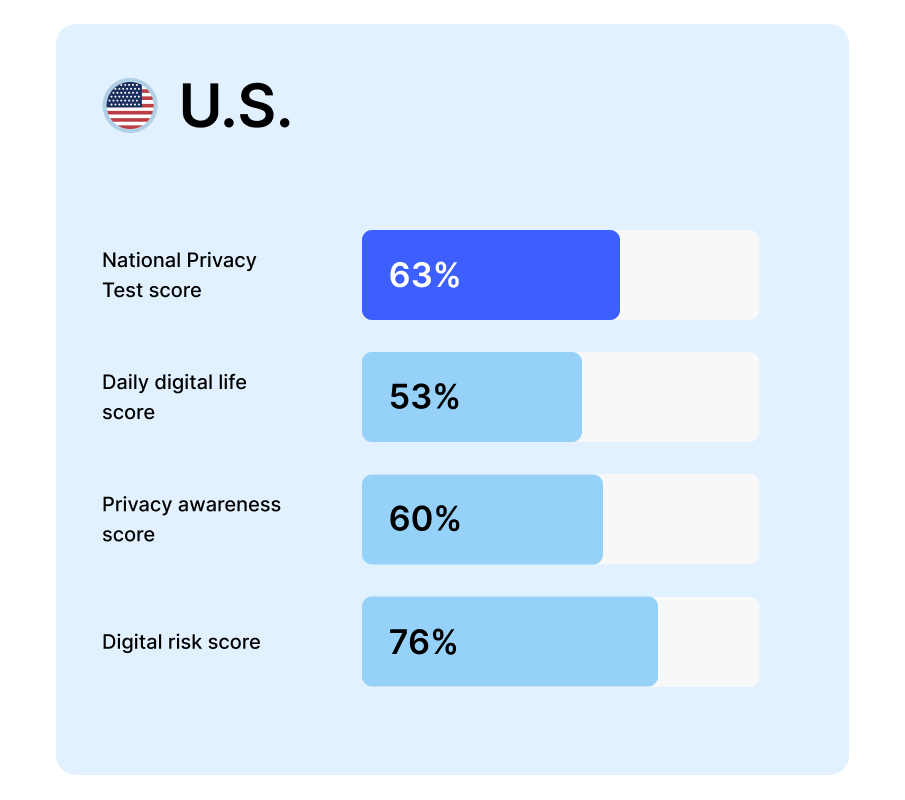
Out of 175 countries which have taken the test, the US had the second-highest average score of 63/100, level with Germany and just behind joint winners Singapore and Poland (64/100). The average global score for the test was 61/100, down from 64/100 in 2022 and 66/100 the year before.
The results showed that while most Americans have basic online safety skills, they lack awareness of practices and tools to protect them while browsing.
In total, 95% of US respondents knew how to create a strong password, correctly choosing the longest option that combined upper and lower-case letters, numbers and symbols. Nine in ten (92%) were aware of the importance of shielding personal information and location data on social media, while 88% knew saving card details on their browser was a risk.
Recognizing digital privacy issues around remote working was a particular blind spot, however. A quarter (27%) failed to identify unsafe internet networks as the biggest threat to their data, believing hacked Internet of Things (IoT) devices, mixing work and home devices, and even a sliding webcam cover were greater risks.
This gap in knowledge also makes Americans more susceptible to a new scam called “juice jacking”, a technique where criminals tamper with public USB charging points so they can steal data from devices that use them. When asked, 12% of US respondents were willing to use a public charging point to charge their laptop when working remotely, putting their device – and sensitive information – at risk of being juice jacked.
Only one in eight (13%) were aware of all the data that their internet provider could gather when they surfed the web. Just over half (55%) realized their email address could be collected, alongside the websites they visited, their unique IP address, the time they spent online and the device they were using.
More than a third (37%) were not aware that Facebook could still collect information on non-users – through cookies on third-party sites that incorporate Facebook engagement functions such as a “like” button.
Marijus Briedis, NordVPN’s Chief Technology Officer comments: “Millions of Americans have big holes in their cybersecurity knowledge, which you can guarantee scammers are itching to exploit.
“Online fraud is hugely lucrative and being run on an industrial scale, so criminals are incentivised to constantly up their game with every technological advance. As one of the most prosperous nations on the planet, US consumers will always be a priority target for bogus schemes.
“Knowing how to set a strong password will only get you so far, especially with biometric identification growing in popularity, so it’s important they learn to spot popular scams like phishing websites before they wind up becoming victims.”
Here are some tips from NordVPN to keep you and your data safe while online:
- Use strong and unique passwords. Create strong passwords for each of your online accounts and avoid using the same password across multiple platforms.
- Use multi-factor authentication (MFA). Implementing multi-factor authentication adds an extra layer of security by requiring users to provide additional verification, such as a one-time code sent to their phone, along with their password.
- Update your software regularly. Keeping software, operating systems, and applications up to date is crucial for fixing known vulnerabilities. Regular updates ensure that security patches are applied promptly, reducing the risk of exploitation by cybercriminals.
- Always use a virtual private network (VPN). A VPN encrypts your internet connection and helps protect your personal information from prying eyes. It is especially crucial when connecting to public Wi-Fi networks.
- Review and adjust privacy settings on social media platforms, mobile apps, and other online services. Limiting access to personal data and choosing the minimum required permissions can help protect privacy.
Try the National Privacy test for yourself, by visiting the official website
Methodology: The National Privacy Test is an open-access survey, allowing anyone from around the world to take the test and compare their own results with the global ones. In 2023, 26,174 respondents from 175 countries answered 22 questions that evaluated their online privacy skills and knowledge. The 2023 results based on the responses given up to 19 July 2023 are presented in the report. If there is a difference with the webpage results, it means more people participated since July 19 and the result has slightly changed.